REVIEW · KUALA LUMPUR
Malaysia eSIM (1 to 30 days. Up to 60GB of Data)
Book on Viator →Operated by Xplori · Bookable on Viator
Your Kuala Lumpur maps, no SIM store needed. What makes this plan interesting is the email-delivered eSIM and the way it provides 4G/5G data at local rates through your trip, so you can handle directions, calls, and messages without the usual SIM-card scramble. The one catch is you must have an eSIM-compatible phone and internet available to activate it.
You can pick 1 to 30 days and get up to 60GB of high-speed data, then speed drops to 3G after you hit the limit. I like that the whole process is self-setup and fast, with remote customer service if activation doesn’t behave.
In This Review
- Key Things I’d Watch Before You Buy
- Malaysia eSIM Setup: Digital Convenience Without the Counter Line
- What You Actually Get: eSIM Data, Not a Physical SIM
- Activation Day Done Right: QR Code + Roaming + Internet
- Data Speed Reality Check: 4G/5G First, 3G After the Cap
- Coverage for Kuala Lumpur Time: From First Connection to Day 30
- Customer Support That Matters: Remote Help When Activation Fights Back
- Price and Value: Why $7.90 Can Be a Smart Move
- Who This eSIM Fits Best (And Who Might Need a Backup Plan)
- Quick Practical Tips Before You Land in Malaysia
- Should You Book This Malaysia eSIM?
- FAQ
- How long does the Malaysia eSIM plan last?
- How much data do I get?
- What speeds do I get?
- How do I receive the eSIM?
- How do I activate it?
- Do I need internet to activate the eSIM?
- When should I set it up?
- What do I need to check on my phone?
- Is there customer support if something goes wrong?
- Is there a refund if I cancel?
Key Things I’d Watch Before You Buy
- Email delivery, QR activation: Get your eSIM setup started fast after ordering.
- 4G/5G at local rates: Built for real-day-to-day use, not just light messaging.
- High-speed cap, then 3G: Plan your data like a grown-up (maps and video calls add up).
- Internet required for activation: Have Wi-Fi or mobile internet available before you scan.
- Remote customer service: There’s help if activation hits a snag.
Malaysia eSIM Setup: Digital Convenience Without the Counter Line
This is a digital Malaysia eSIM built for travelers who want connectivity right away, especially when your schedule is tight and you do not want to spend time finding a SIM shop in Kuala Lumpur. You are not dealing with a plastic card, a pickup, or a meetup—everything happens through your phone, starting with a QR code.
The main value here is speed of access. You place your order, then receive the eSIM by email. After that, activation is meant to be quick: you scan the unique QR code and enable the plan. In the real world, that matters because the first hours after arrival are when you most need working data for maps, ride-hailing, translating menus, and sending the occasional message home.
The plan is also flexible. You choose a duration from 1 to 30 days, and the data amount is capped at what you select (up to 60GB of high-speed data). That turns your SIM decision into a simple “how long am I here, how much data will I use?” math problem instead of “what is the best local SIM counter deal today?”
One more practical point: the provider asks you to do setup on the same day as your departure date. That’s a smart move because it reduces the chance of arriving to Malaysia with a phone that is only half-configured.
You can also read our reviews of more tours and experiences in Kuala Lumpur.



What You Actually Get: eSIM Data, Not a Physical SIM
To avoid confusion, here is the product in plain language: you get mobile data access for the duration you selected. That means no physical shipping, no meeting point staff, and no returning a router at the end.
Your email-delivered package includes what you need to activate. You will use a QR code to install the eSIM profile on your device. Because this is entirely digital, your order lives inside your email inbox and your phone’s settings. If your inbox is hard to find, set up a filter now. Future-you will thank present-you.
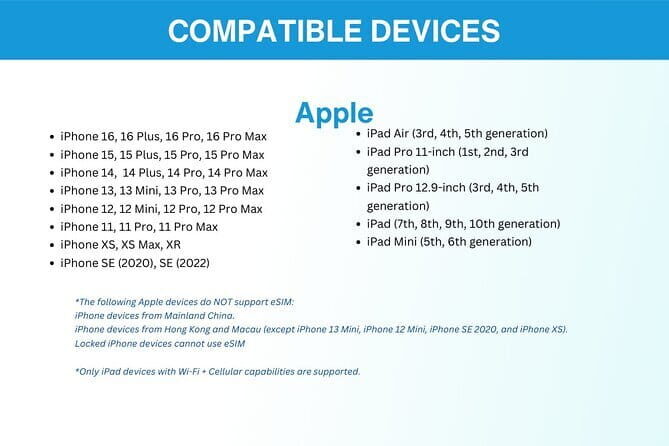
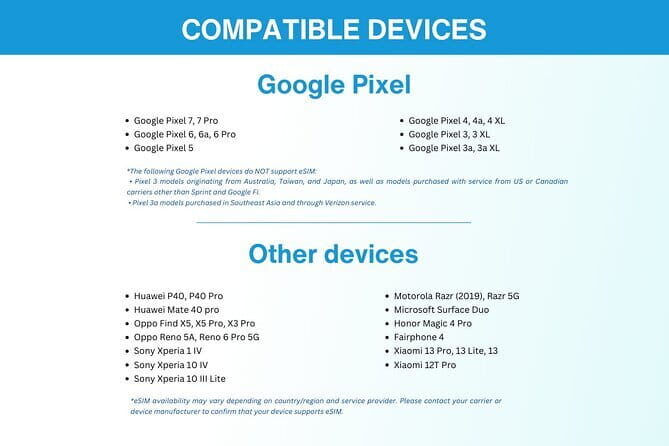
Also, double-check the basics before you rely on it. Your phone must support eSIM technology. That sounds obvious, but it is the most common reason digital travel products become a stressful project. If you are not sure, ask customer support before you arrive—remote support is included.
Activation Day Done Right: QR Code + Roaming + Internet
Activation is where most people either feel clever… or feel cursed. This one has a clear checklist, and following it is the difference between smooth setup and wasted time.
Here is the key sequence you should plan for:
- Have internet access available to activate the eSIM (Wi-Fi is fine).
- Scan the QR code and install/activate the plan using the instructions that come with your email.
- When you reach Malaysia, enable data roaming so the plan actually connects.
The tip that deserves repeating is this: print the QR code and carry it during your vacation as a precaution. You might be thinking, I have a phone—sure. Then imagine your phone battery dies, your case blocks the screen, or your email attachment disappears into spam. A paper QR code is a cheap, low-tech safety net.
In the feedback, the activation process is described as smooth, and internet speeds are reported as fast and reliable. That lines up with what you want to hear from an eSIM product: not just “it works,” but “it works quickly and stays stable.”
Data Speed Reality Check: 4G/5G First, 3G After the Cap

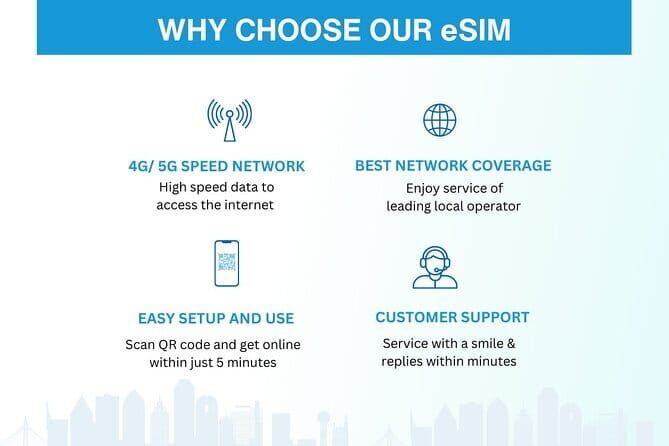
This plan is built around practical data use. You get 4G/5G data at local rates, which is what you need for maps, messaging, ride booking, and the occasional video call. And the cap is clearly defined: high-speed usage is capped at the mentioned amount (up to 60GB), then your speed drops to 3G.
This matters because many travelers underestimate what consumes data fastest. Video calls, streaming, and uploading photos can chew through data faster than you expect—especially if you are also using map apps all day. If you are the type who posts updates constantly, you may hit the cap early in your stay.
On the other hand, if your usage is mostly navigation, messaging, and checking information, you can stretch the high-speed portion comfortably. One buyer highlighted that streaming and video calls worked without interruptions, which suggests the connection is strong enough for real-time use during the high-speed portion.
If you are going longer than a week and you want to stay productive without thinking too hard, consider this rule of thumb:
- If you plan on heavy media use, pick a longer duration with a higher data allowance.
- If you will mostly text and use maps, a smaller cap may be fine.
The biggest advantage is that you get a predictable structure: you know what you will experience before you land.
Coverage for Kuala Lumpur Time: From First Connection to Day 30
The plan is designed for travel in Malaysia with your main start point in Kuala Lumpur. The end point listed is near the PETRONAS Twin Towers (Tower 1) area. Since this is a digital product, those addresses are not a “tour route” in the usual sense. They just anchor where the experience is tied to geographically.
In day-to-day terms, you should expect stable connectivity across a range of places—at least as far as the service is capable—because the product is marketed for city and travel use. One buyer even called out strong performance in rural areas, which is a good sign if your plans include longer day trips outside Kuala Lumpur.
What I like for you is the flexibility: you can keep the same plan structure across your trip length. You are not constantly swapping SIM cards or reconfiguring phones. That saves time and reduces the chance you forget which card is installed where.
It is also helpful that you can use eSIM switching across countries. One buyer specifically praised the idea of avoiding physical SIM cards when traveling internationally. If you are doing a multi-country loop, that convenience can be a real quality-of-life improvement.



Customer Support That Matters: Remote Help When Activation Fights Back
Most travel tech fails quietly, like a slow internet connection. This product includes remote customer service, which is the right safety valve for something as finicky as eSIM activation.
In the feedback, customer support is described as solving issues quickly and professionally, which is exactly what you want if you run into a setup problem. Even though the process is designed to be easy, phones have different settings, iOS versions differ, and sometimes QR scans need a second attempt.
So here is my practical advice:
- If activation fails, do not guess for hours.
- Check device compatibility first.
- Then contact support sooner rather than later, while your arrival-day stress is still manageable.
Because the product is delivered by email and activated by QR code, there is no “find the office” solution. Remote support is the route, so take advantage of it if something is unclear.
Price and Value: Why $7.90 Can Be a Smart Move

At $7.90 per person, this eSIM is positioned as a budget-friendly way to get reliable data in Malaysia without buying a local SIM at a counter. Whether it is a deal depends on how you travel and how much data you actually use.
Here is how I judge value for an eSIM:
- Convenience value: no physical SIM shopping, no pickup time, no waiting for a router.
- Connectivity value: you get 4G/5G at local rates during the high-speed portion.
- Predictability value: you know the cap (up to 60GB) and what happens after (3G).
If you would normally arrive and immediately spend time locating a SIM provider, the time you save can easily be worth more than the difference between this and a more expensive option. Also, if you are traveling with multiple people, each person’s phone becomes its own small project—digital delivery keeps things clean.
The only real cost risk is the data cap. If you blow through the high-speed allotment early, you will live with 3G speed afterward. That does not mean the service stops, but it can make streaming or heavy uploads less pleasant. For map use and basic communication, 3G can still work, just at a slower pace.
Who This eSIM Fits Best (And Who Might Need a Backup Plan)

This experience is best for travelers who:
- Have an eSIM-compatible phone.
- Want data coverage quickly without searching for a SIM shop.
- Prefer choosing a plan by duration (1 to 30 days) and knowing the data cap up front.
- Like the idea of a simple international setup, especially if you are moving between countries.
It might not be ideal if:
- Your phone does not support eSIM.
- You arrive with no way to get internet access for activation (because internet is required to activate).
- You rely on heavy video streaming for much of the day and you are worried about reaching the high-speed cap.
Also consider printing the QR code as suggested. Even if you never use it, carrying a printed backup makes the whole trip feel less fragile.
Quick Practical Tips Before You Land in Malaysia
These are the small things that prevent big annoyances:
- Confirm eSIM support before you book, not after you land.
- Save the activation email somewhere you can find fast.
- Have Wi-Fi ready for activation so you are not stuck hunting for connectivity.
- Enable data roaming when you arrive, since the plan needs roaming turned on to connect.
One buyer mentioned the simplicity of switching carriers and avoiding the physical SIM hassle. That is the core benefit. If you prepare for activation once, the rest of your trip feels like using your phone normally, just with data.
Should You Book This Malaysia eSIM?
If you want an easy, low-fuss way to stay online in Kuala Lumpur and beyond, I think this is a strong choice. The combination of email delivery, QR-code activation, and 4G/5G data at local rates is exactly what most people want from an eSIM. Add in remote customer service and feedback about fast, reliable connectivity, and it looks like a sensible purchase for both short and longer stays.
I would book it if:
- Your phone supports eSIM.
- You can activate it the day of departure (or at least have internet to do so).
- You are comfortable managing data use around a high-speed cap that drops to 3G after you hit it.
Skip it or plan a backup if:
- You might not have internet available for activation.
- You are uncertain about eSIM compatibility.
- You expect constant high-bandwidth streaming for the entire trip.
If you want one less thing to worry about on arrival day, this is the kind of product that earns its keep.
FAQ
How long does the Malaysia eSIM plan last?
You can select a duration of 1 to 30 days.
How much data do I get?
The plan offers up to 60GB of data at high speed.
What speeds do I get?
The eSIM provides 4G/5G data at local rates. After your high-speed data cap is used, speed switches to 3G.
How do I receive the eSIM?
You receive the eSIM by email after ordering.
How do I activate it?
You activate it by scanning the unique QR code included with your eSIM details.
Do I need internet to activate the eSIM?
Yes. Internet access is required to activate the eSIM.
When should I set it up?
The guidance is to set up your eSIM on the same day as your departure date, then enable it when you arrive.
What do I need to check on my phone?
You should double-check that your device supports eSIM technology.
Is there customer support if something goes wrong?
Yes. Remote customer service is included.
Is there a refund if I cancel?
Yes. You can cancel for a full refund up to 24 hours in advance of the experience’s start time.